The short answer
- The core tools
- A DOM for resting orders, a footprint chart for executed trades by side, and a liquidity heatmap for how the book changes over time. Time & Sales and cumulative delta add detail.
- Data you need
- Depth of market (Level 2) for the DOM and heatmap. Trades with their bid or ask side for the footprint. On CME, depth costs more than top-of-book data.
- Native Mac options
- Lightwick, MotiveWave, and Bookmap run natively and connect to Rithmic; Lightwick also connects to Topstep accounts through TopstepX. ATAS X is in beta for macOS Tahoe.
The tools, and what each shows
| Tool | What it shows | In Lightwick |
|---|---|---|
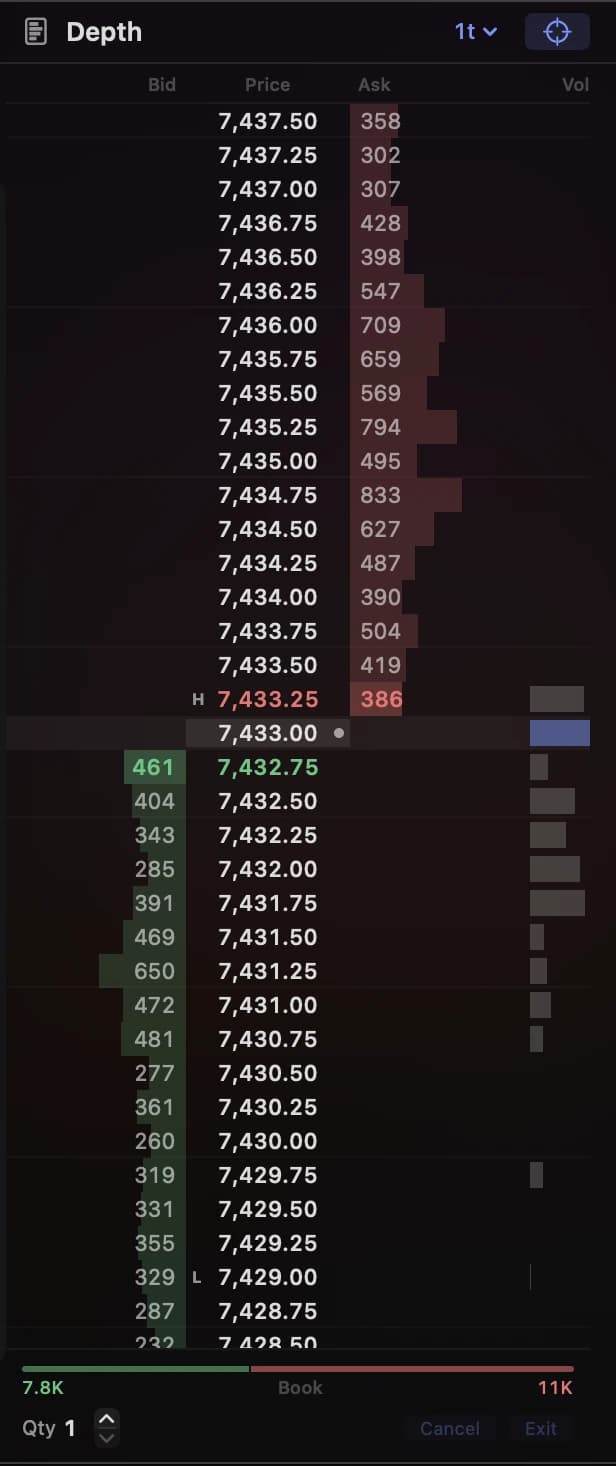
| DOM | Resting bids and offers at each price, which can change or vanish at any moment. | Yes, with columns for volume sold at the bid and bought at the ask. |
| Footprint | Volume traded at the bid and ask, at each price, inside each bar. | Yes, with delta, imbalances, and point of control. Footprint guide. |
| Liquidity heatmap | The book over time: bright bands where size rested, with bubbles for trades. | Not yet. |
| Time & Sales | Every trade as it prints: time, price, size, and side. | No. |
| Cumulative delta | A running total of ask volume minus bid volume across bars. | Per-bar delta and a rolling delta on the DOM; no cumulative line. |
| Volume profile | Total volume at each price over a session or range. | Yes, as Volume Profile and TPO Profile studies for each session, week, or month, with point of control and value area, plus a TPO chart type. |
Each tool covers a gap in the others. The DOM shows intention that may never trade. The footprint and tape show what did trade. The heatmap shows whether the orders you saw on the DOM stayed, got filled, or were pulled.
Get the right market data
Order flow tools are only as good as the feed behind them. For CME futures, three questions matter.
Top of book or depth?
Top-of-book data covers the best bid and ask and trades, which is enough for a footprint. A DOM or heatmap needs depth. Through AMP, for example, non-professional CME data costs $5 a month per exchange for Level 1 and $17 for Level 2, or $45 for the Level 2 bundle across CME, CBOT, NYMEX, and COMEX, as of June 2026. Your firm or broker sets its own prices.
Market by price or by order?
Most DOMs show market-by-price data, a total at each price. CME’s market-by-order data adds individual orders and queue position. Check which your platform displays before comparing ladders.
Live only, or history too?
Live tools work from your feed as it streams. Studying yesterday’s footprint or heatmap needs stored tick or depth history, which platforms handle very differently. Bookmap, for example, lists Rithmic backfill as one hour free, with 24 hours at $14 a month per exchange.
Order flow platforms on a Mac
Native on macOS
Lightwick combines a DOM, footprint, and volume profile for Rithmic and TopstepX accounts. MotiveWave’s Order Flow edition adds footprints, cumulative delta, DOM history, and Big Trades, with connections beyond Rithmic. Bookmap is built around the heatmap and has Mac versions for Intel and Apple silicon, with Rithmic, CQG, and dxFeed adapters. ATAS X brings ATAS to macOS in beta.
In a browser or web-based app
TradingView offers a volume footprint on Premium plans. Tradovate includes bid-ask charts and volume profile, but only for Tradovate accounts.
Windows only
NinjaTrader Desktop with Order Flow+, Sierra Chart, Quantower, and classic ATAS. They run on a Mac in a Windows virtual machine. See NinjaTrader, Sierra Chart, and ATAS on Mac.
Set up an order flow workspace in Lightwick
- Arrange the DOM. Open DOM settings to reorder columns and show volume sold at the bid and bought at the ask beside the book.
- Pick a rolling window. The DOM can show trade delta over the last 5, 10, 30, or 60 seconds, so you can see which side is pressing right now.
- Open a footprint and a profile. Put the Footprint and TPO chart types side by side in a two- or four-chart grid, or in separate windows on a second display, and add a Volume Profile study to either.
- Set your order keys. Buy, sell, cancel, exit, and flatten all have rebindable shortcuts, with an option to confirm before sending.
- Attach a bracket. Stops and targets go to Rithmic as native server-side brackets. On TopstepX, attach one stop and one target with Auto OCO Brackets turned on in TopstepX.
One limit to know: there’s no liquidity heatmap, Time & Sales window, or cumulative delta study yet. If the tape is central to how you trade, pair Lightwick with a platform that has one, or choose one that covers everything.
Lightwick’s DOM is in the Trader plan; footprint charts are in Pro. Both are free during beta. For ladder basics and order-entry practice, read the DOM trading guide.
Common questions
Do I need market-by-order data?
Not to start. Market-by-price data groups resting orders into a total at each price, which is what most DOMs show. CME says market-by-order data adds individual order sizes and queue position. It helps if you study how single large orders behave, and costs more to get.
Does a prop firm evaluation account get the same order flow data?
Usually the data is live even when the account is not. Rithmic’s exchange simulator, which many evaluation accounts run on, uses live market data with simulated fills. Whether depth data is included, and what it costs, varies by firm.
Can I backtest an order flow strategy on a Mac?
Only with historical tick data that includes bid and ask volume, or recorded depth for heatmap ideas. Lightwick’s strategy tester runs on standard bars, so it can’t test footprint or DOM signals. Platforms that sell long tick history, mostly on Windows, are better suited.
Heatmap or footprint: which should I learn first?
They answer different questions. A heatmap shows where liquidity is resting and when it’s pulled; a footprint shows who traded and how aggressively. Many traders start with the DOM and footprint, then add a heatmap once they’re reading the book confidently.
Further reading
Try Lightwick on your Mac.
Try Lightwick free during beta. No credit card required.
Join the free beta