Skip to content

The native Mac workspace for prop firm traders.

Free during beta. No credit card required.

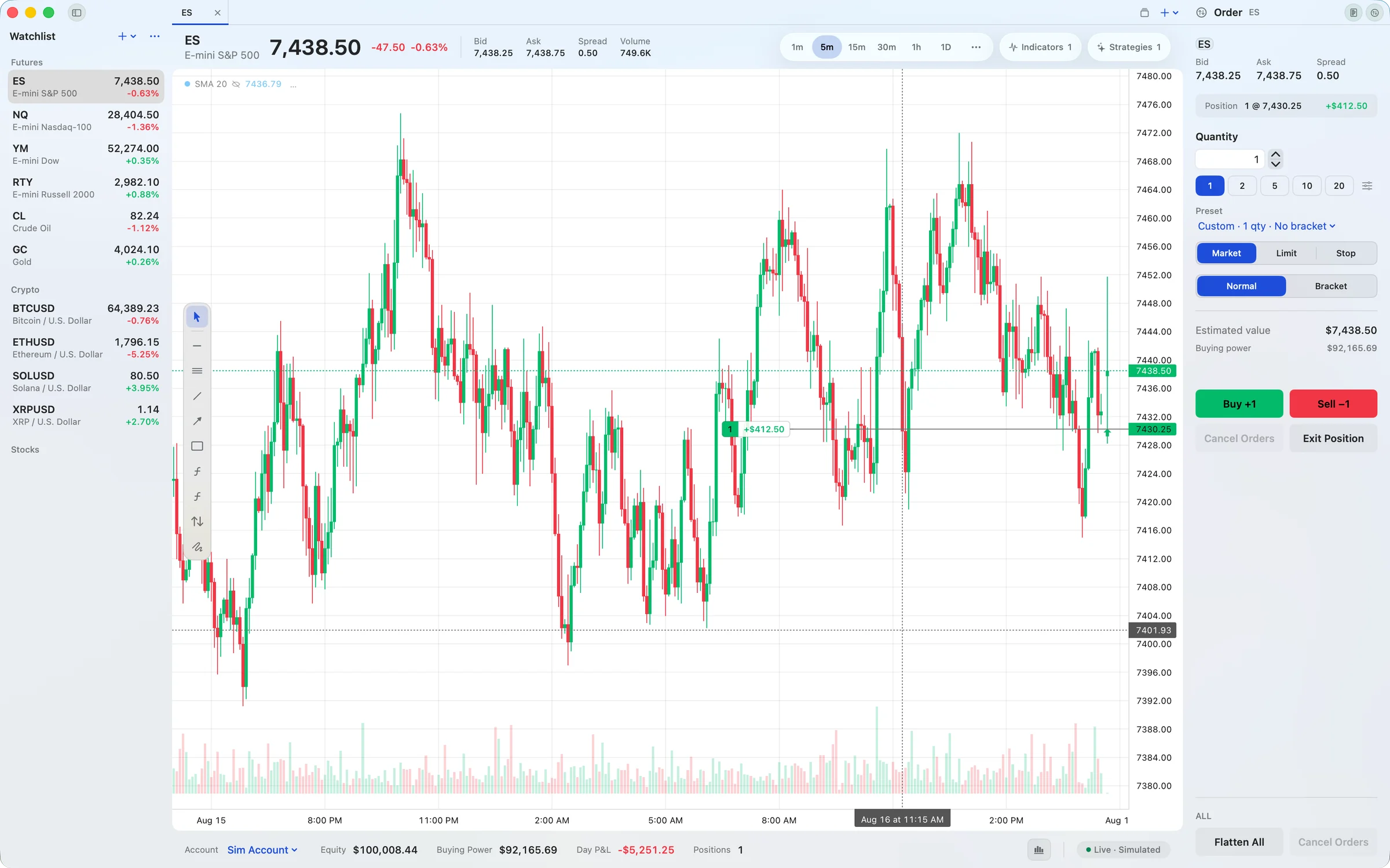
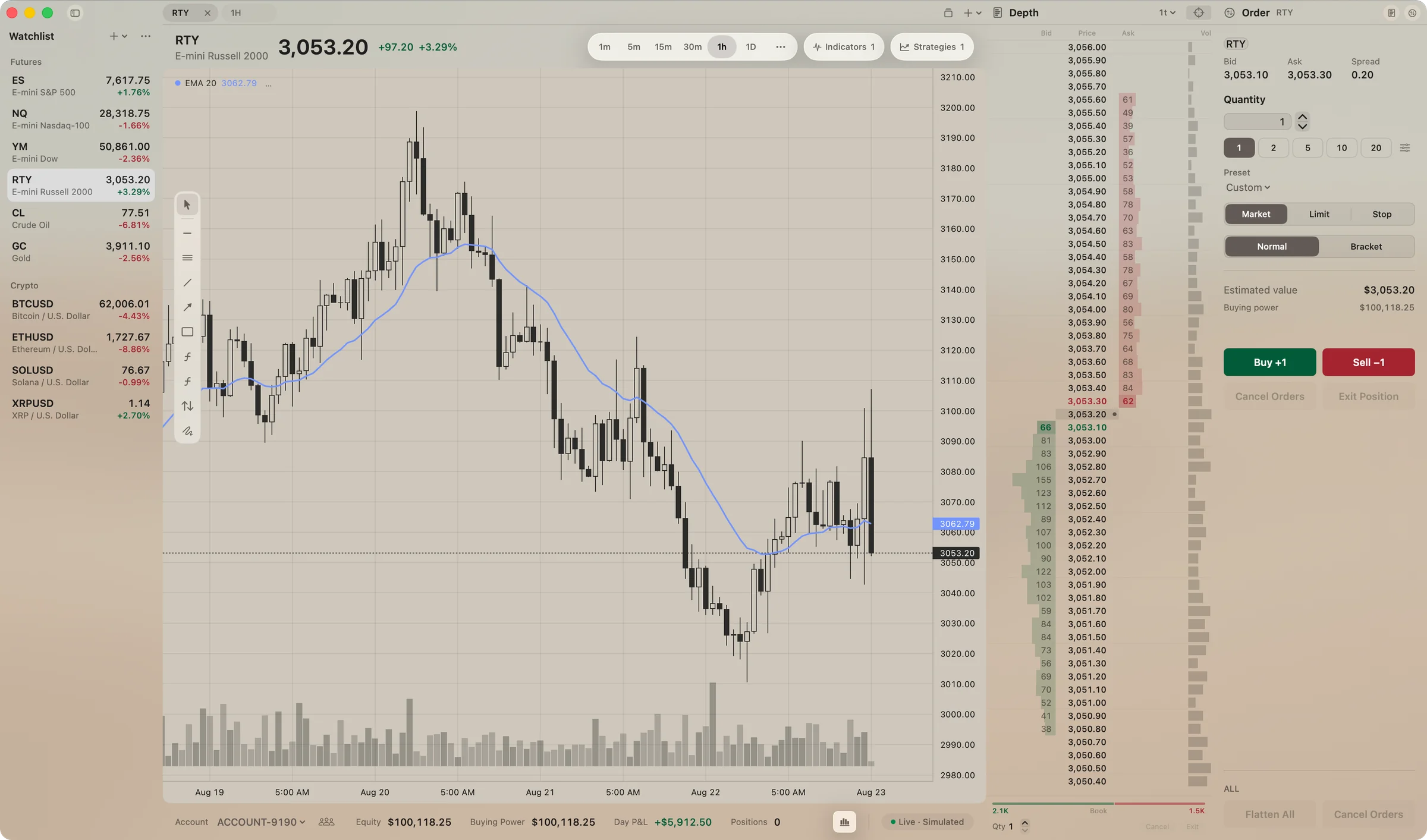
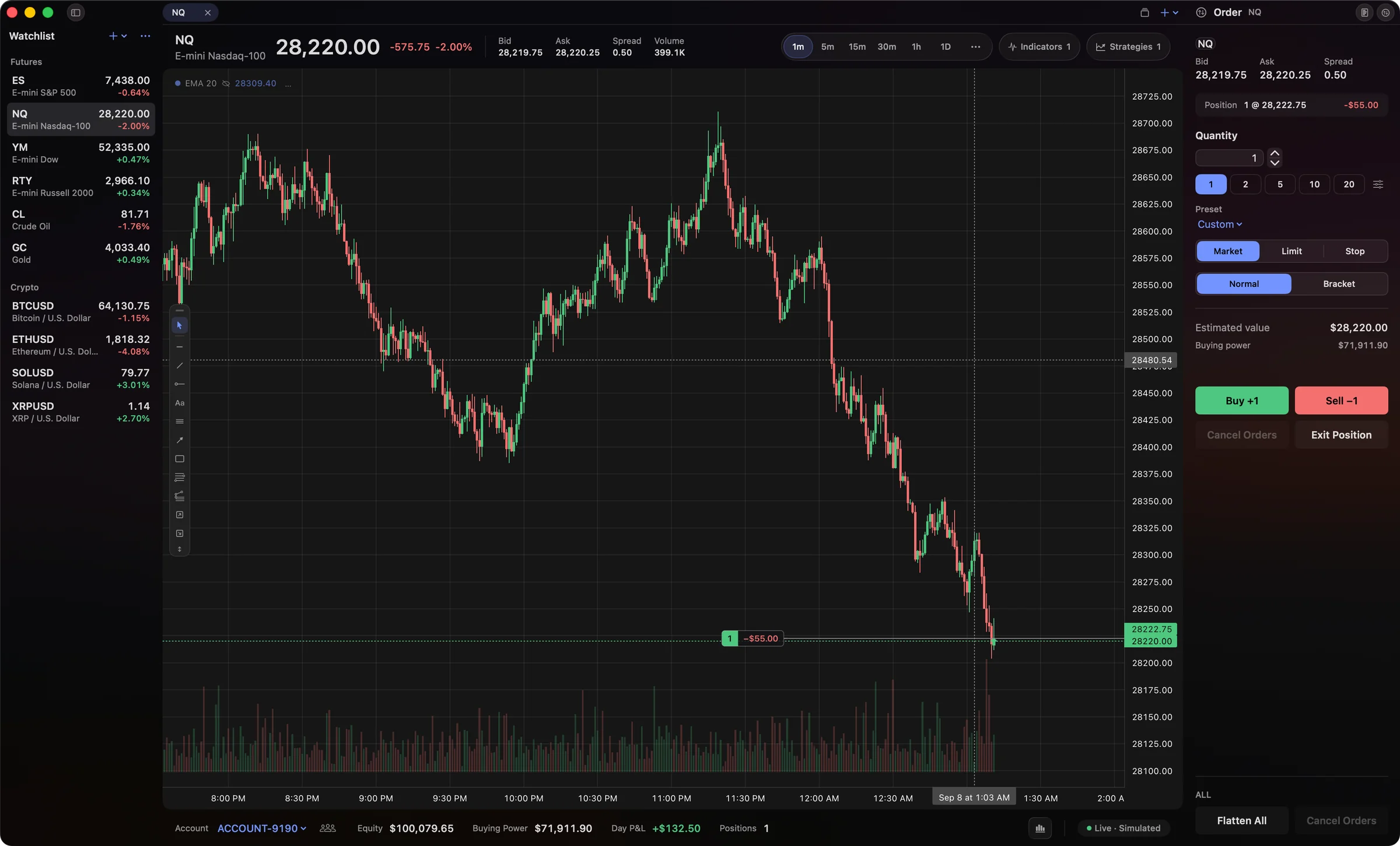
Everything you need to trade, in one window.

Watchlist on the left, order ticket on the right, account along the bottom, chart in the middle. No tabs to hunt through, no windows to arrange. Every tile below is live, so go ahead and drag a stop, rest an order, or send a bracket.

NewFind your indicators faster
ESE-mini S&P 500 · 5m
6,043.75+22.25 +0.37%
Open P&L
+$125.00
Risk / reward
1.87
1TP+$537.5043 ticks
1SL−$287.5023 ticks

Long 1 ES at 6,041.25. Target 6,052.00, stop 6,035.50, risk to reward 1.87.

Trade straight from the chart.

Your entry, stop and target sit right on the price. Drag a line to move it, and your risk updates as you go.


DepthES1 tick

Click a price to rest an order.

A DOM you can trade from.

Bids, offers, your working orders and session volume at every price. Click a level to place an order there.

OrderES
Bid
6,043.50
Ask
6,043.75
Spread
0.25
Position$0.00
Active Orders
Quantity1
Limit price6,042.75
Stop loss
SL151−$250.00
Take profit
TP151+$250.00
Estimated value$6,043.75

SIMSim Account

Know exactly what you're sending.

Market, limit, stop, or a full bracket. Confirmation shows up inline, so nothing ever pops over your chart.

ES · 5m · 1.00 rows

Footprint chart showing bid and ask volume at each price for the last nine ES candles.

See inside every candle.

Footprint charts show you the volume at every price, bid against ask, or the delta between them. Spot where the real buying and selling happened.

Copy Trader
Copy tradesCopying
Start copying automatically when Lightwick opens

Leader

Leader50K-EVAL-01

Followers

50K-EVAL-02Same size
50K-EVAL-03Same size
100K-EVAL-01Multiplier2×
25K-EVAL-01Fixed1contract
Add Follower
Delete Group…RevertSave

The Copy Trader window: the group Evals has 50K-EVAL-01 as its leader and four followers, two at the same size, one at 2×, and one with a fixed 1 contract. Copying is on.

Trade one account. Copy it to the rest.

Pick a leader account and add followers. Every order, change, cancel and bracket is mirrored to each follower, at the same size, a multiplier, or a fixed number of contracts. Great for running several funded accounts at once.

Mark up your charts.

Trend lines, channels, rectangles, Fibonacci levels and long or short position tools, from a toolbar you can put wherever you like.

Watchlist
Futures
Crypto futures
ESE-mini S&P 500
6,043.75+22.25 (+0.37%)
Prev close
6,021.50
Range
6,019.25 – 6,050.75

Your markets, one click away.

Index, energy, metal and crypto futures in one list. Click a symbol and the chart switches with it.

All sessionsSimulator · September 2026
Realized P&L
+$4,396.00
Round turns
60
Win rate
57%
Profit factor
1.72
Avg win
+$307.78
Avg loss
−$233.40
September 202621 sessions +$4,396.00
MonTueWedThuFri
31
7Closed
12

Know how you're actually doing.

Fills are matched into round-trip trades automatically. See your P&L by session, win rate, profit factor, and average win and loss.

ESE-mini S&P 500
6,045.25+23.75 (+0.39%)
6,045
Crosses above 6,045 · OnceTriggered · paused
Price alert · Rithmic Livenow

ES crosses above 6,045 · Last 6,045.25

An ES price alert at 6,045. When the last price crosses it, Lightwick posts a macOS notification: “ES crosses above 6,045 · Last 6,045.25”.

Get told the moment price gets there.

Set an alert at any price. When the market crosses it, you get a notification and a sound, even if Lightwick is in the background.

Customize the whole workspace.

Set the accent, the glass tint, the grid and your candle colors. Start from one of 27 built-in themes, or from a blank one, and save what you make.

The Lightwick window in the built-in light theme.
The Lightwick window in a custom theme, with sand-colored glass and monochrome candles.
The Lightwick window in the built-in dark theme.

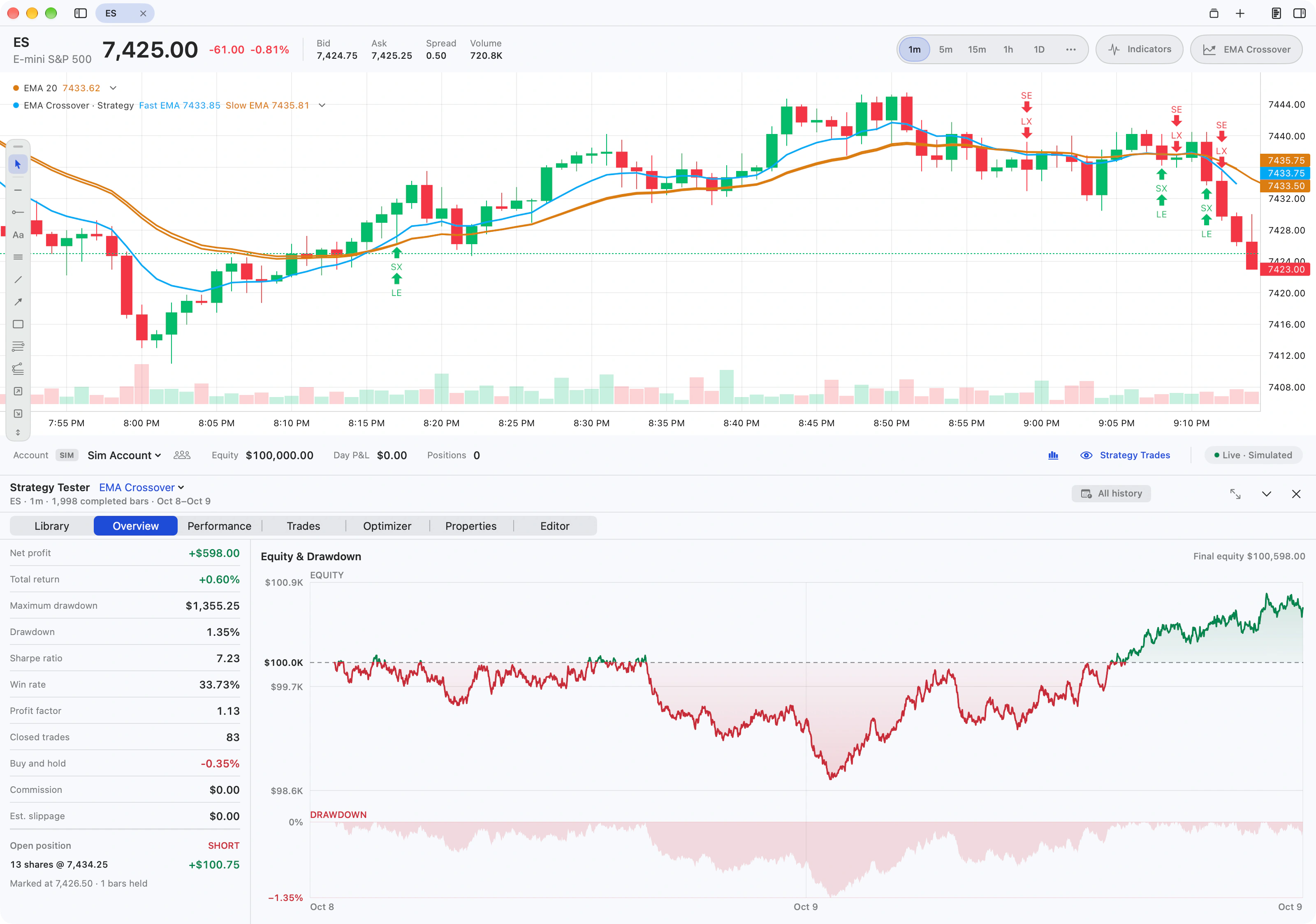
Test the idea before you trade it.

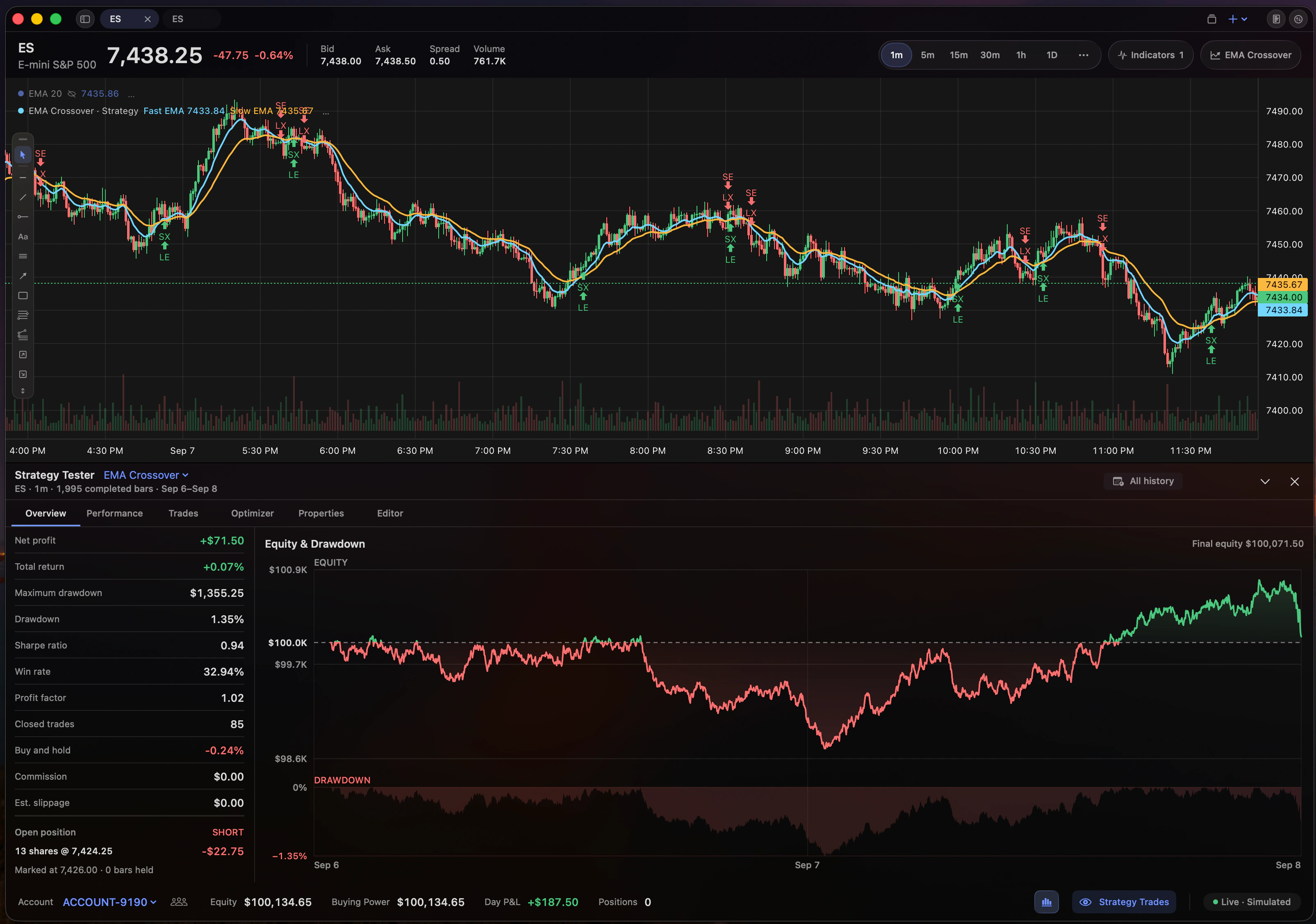
Run your strategy against historical data, dial in its settings, and step through every simulated trade on the chart. Find out what works before real money is on the line.

The Lightwick strategy tester: a chart with simulated entries and exits above an equity and drawdown curve and a performance summary.The Lightwick strategy tester: a chart with simulated entries and exits above an equity and drawdown curve and a performance summary.
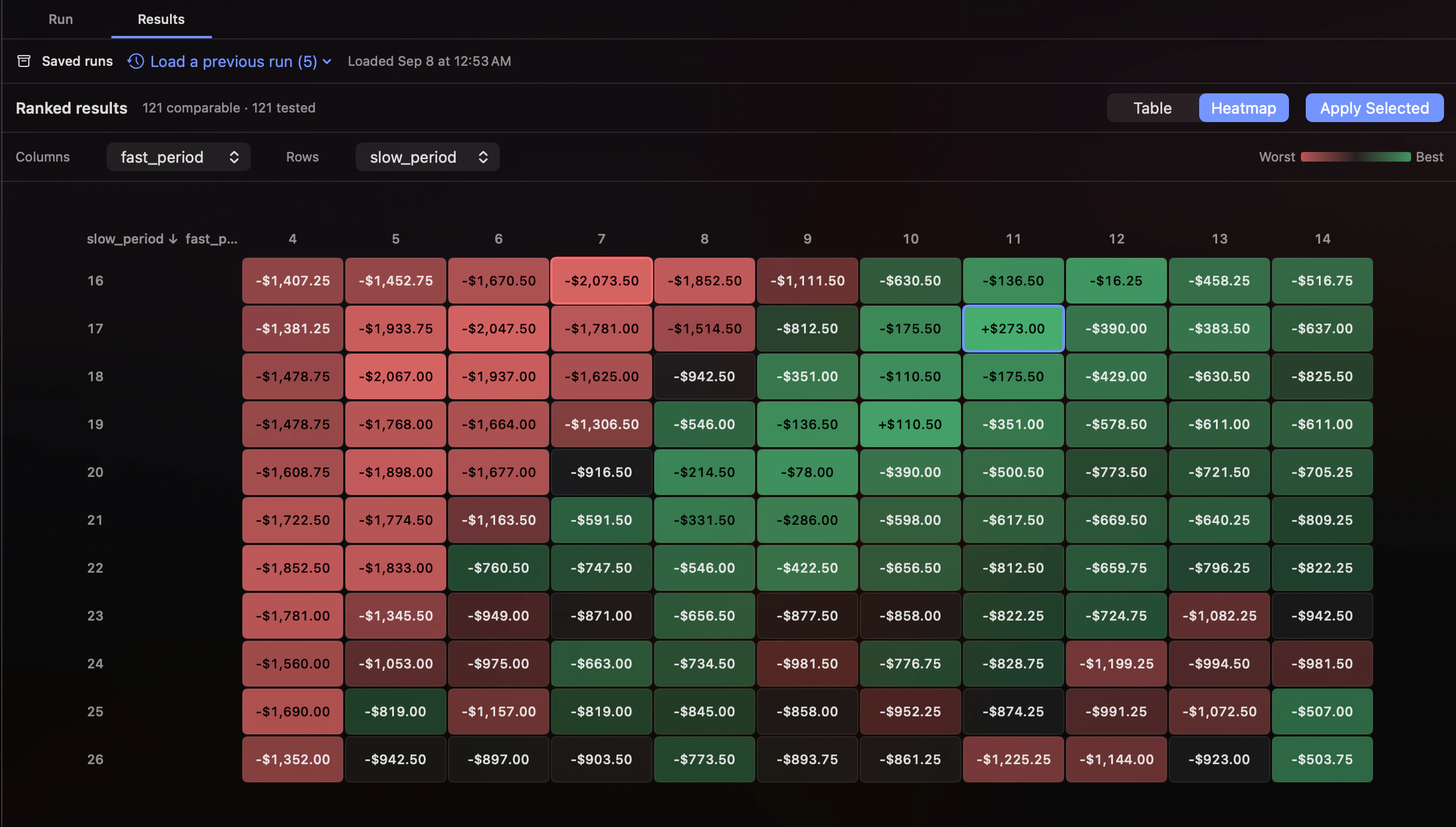
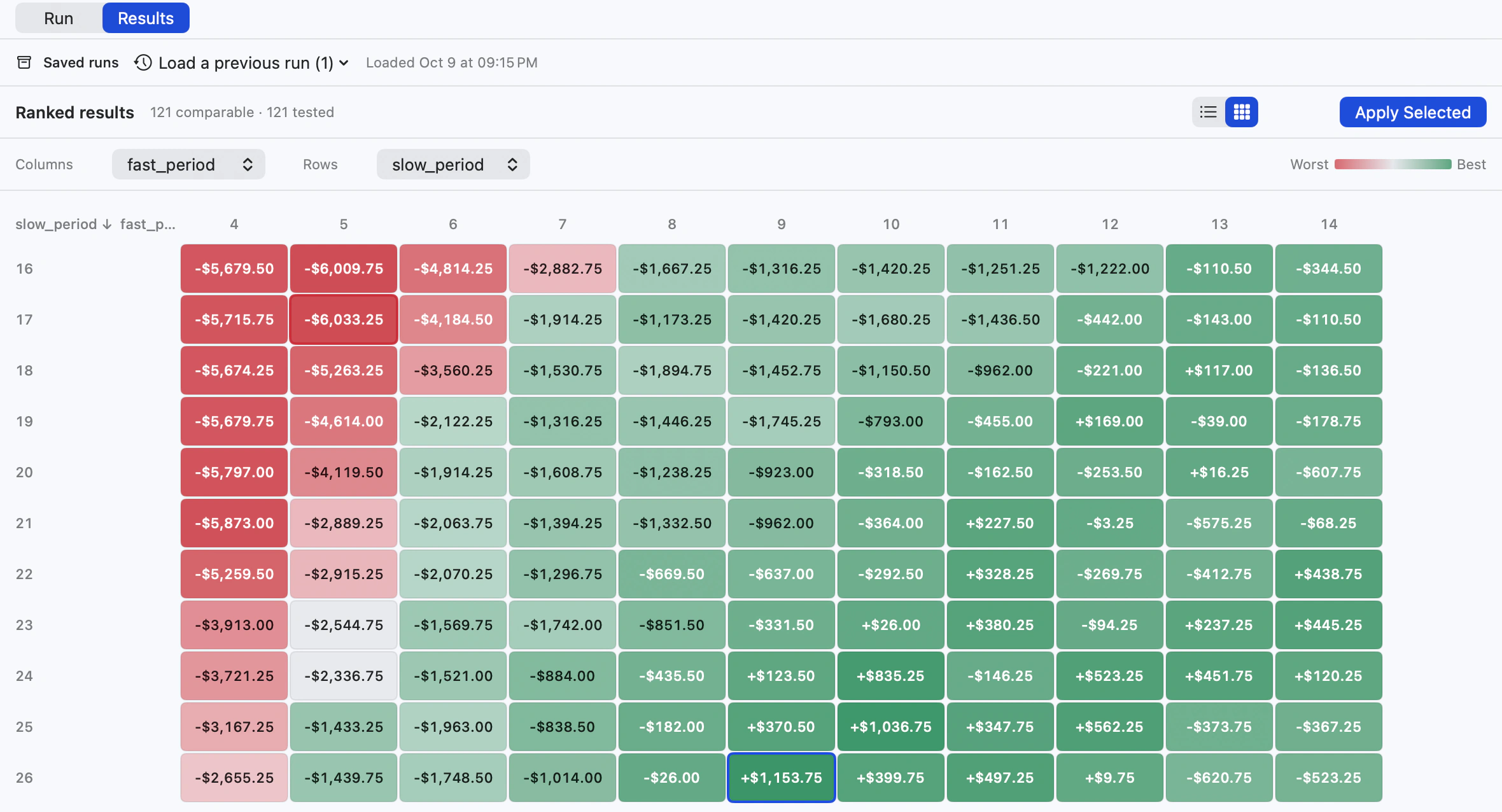
The Lightwick optimizer heatmap ranking each combination of two strategy settings.The Lightwick optimizer heatmap ranking each combination of two strategy settings.
Strategy tester. Watch every entry and exit on the chart, with an equity curve showing how the backtest played out. Optimizer. A heatmap shows how each combination of settings performed, so the best ones are easy to spot.

Bring your own AI assistant.

Lightwick has a built-in MCP server. Point Claude Code, Codex, Cursor, or any other MCP client at it and your assistant can write strategies, backtest them, and optimize the settings for you.

It works from market data already on your Mac, and every result is calculated by Lightwick’s own research engine. Strategies are written in Lightwick Script, a small language built for this.

Assistant · Lightwick MCP
  1. Find the parameter set for my opening-range strategy that holds up across six months of ES.

  2. lightwick.get_bars ES · 5m · 6 months

    12,480 completed bars from Lightwick’s local history

  3. lightwick.create_strategy opening-range

    Compiled and saved · 4 parameters exposed

  4. lightwick.backtest 1 run · full range

    Baseline complete · equity curve returned

  5. lightwick.optimize 4 parameters · 1,296 runs

    Ranked · top 3 parameter sets returned

  6. Here are the three strongest parameter sets from 1,296 runs:

    RankLengthStopSessionScore
    1341.75R09:30–11:000.91
    2302.00R09:30–11:000.88
    3381.50R09:30–10:300.86

Illustrative session. Scores are relative optimizer output on sample data.

  • get_bars

    Pull completed price and volume bars from Lightwick’s local history, including which dates are available and where the gaps are.

  • create_strategy

    Check a strategy for errors and save it to your library, ready to test.

  • backtest

    Simulate every trade bar by bar, with contract size, commissions, slippage and exit rules accounted for.

  • optimize

    Run a strategy across a range of settings and hand the ranked results back to your assistant.

Works with the prop firm account you already have.

Connect any prop firm that runs on Rithmic, your Topstep account through TopstepX, or your Propr challenge. You sign in with your own login or API key.

Powered by OMNE
Market Data by Rithmic
TopstepX

Trade your Propr challenge from your Mac.

Add your Propr API key and trade Hyperliquid perps: crypto, stocks, commodities and FX. Size orders in dollars or coins, and keep your profit target, daily loss and drawdown in view while you trade.

  • BitcoinCrypto—
  • NvidiaStock—
  • GoldCommodity—
  • EuroFX—

Live from Hyperliquid. No Propr account yet? Watch these markets without a key.

Read the Propr on Mac guide
$25K Classic 2-StepACTIVE
Phase 1 of 2 · 3 trading days
Balance
$25,412.00
Since start
+$412.00 (+1.65%)
Today
−$120.00
Profit target$412 of $1,250
$838 to go · 5% of $25,000
Daily loss$120 of $1,250
$1,130 left today · 5% of $25,000
Drawdown$228 of $2,000
$1,772 left · floor $23,640, 8% under the $25,640 high
Estimated from your live balance. Propr enforces the limits.Dashboard
BTC—
$5,000USDC ⇅
TypeMarketLimitStop
MarginIsolated · 5×
Take profit+$150 · +$300
Stop loss−$125
Buy — BTC
Order value
—
Margin required
—
Liquidation
—

Trade somewhere we don’t support yet? More connections are on the way. Tell us which one you need

Free while we’re in beta.

Everything in Trader and Pro is free during beta. No credit card, no trial clock. Here’s what it will cost afterwards, and you’ll hear from us well before beta ends.

Trader

Free during beta

Everything you need to trade every day.

$29per month after beta

Join the free beta
  • Charts, indicators & drawing tools
  • Trade from the chart, the ticket, or the DOM
  • Price alerts with notifications
  • Watchlists & 27 themes
  • Trade history & performance stats
  • Rithmic, TopstepX & Propr connections
  • As many accounts as you trade
  • Copy trading across your accounts

Pro

Free during beta

For traders who want to look deeper and test ideas.

$39per month after beta

Join the free beta
  • Everything in Trader
  • Footprint charts: bid × ask & delta
  • Strategy tester & optimizer
  • Lightwick Script for your own strategies
  • MCP server for your AI assistant

Enterprise

Lightwick for every trader at your firm.

Custombased on committed seats

Contact sales
  • Pro features for every trader
  • One license for the whole firm
  • Volume pricing on committed seats
  • Support & rollout planned with you

Prices are in USD, billed monthly after beta. Your Rithmic market data, TopstepX API access, and prop firm fees are paid to those providers as usual, during beta too.

Questions, answered.

Didn’t find yours? Ask in Discord or email hello@lightwick.trade.

Which prop firms can I trade with?

Any firm whose accounts run on Rithmic, which covers most futures prop firms, including Apex, TradeDay, Lucid, Tradeify and many more. Topstep works too, through TopstepX, and so does Propr, the crypto prop firm, through its API. Rithmic evaluation and funded accounts both connect, using the same login your firm gave you. Firms that only offer Tradovate or NinjaTrader connections are not supported yet.

Does it work with Topstep?

Yes. Topstep trades on TopstepX, and Lightwick connects to it with an API key from TopstepX API access. Topstep sells that separately for $29 a month, or $14.50 with their discount code. Trading Combine and Express Funded accounts can connect. Topstep does not allow Live Funded accounts through the API, so those stay in TopstepX for now.

Does it work with Propr?

Yes. Propr’s challenges trade Hyperliquid perps, and Lightwick connects with an API key you create in Propr’s Settings, which Propr doesn’t charge for. Prices come straight from Hyperliquid. Your active challenges connect; funded Propr accounts aren’t listed yet, so those stay in Propr’s Trading Terminal for now.

What can I trade?

Whatever your firm lets you trade on that account. Lightwick shows the products your Rithmic or TopstepX connection gives you access to, so if your firm offers ES, NQ, CL, GC and the micros, that is what you will see. With Propr, it is the Hyperliquid perps Propr allows. There is no separate list of markets on our side.

Do I need a separate market data subscription?

Not from us. Market data arrives through the same Rithmic or TopstepX connection you trade on, so there is nothing extra to buy from Lightwick. Any data fees from Rithmic, Topstep or your firm apply as they normally would. With Propr, prices come from Hyperliquid’s public feed, which is free.

What Mac do I need?

A Mac with Apple silicon running macOS 15 Sequoia or later. Intel Macs are not supported yet, and there is no Windows version. The app is signed and notarized by Apple, so it installs like any other Mac app.

Can I trade more than one account at once?

Yes. Connect every account you have, switch between them, and keep an eye on all of them from the account bar. Copy trading goes a step further: pick one account as the leader and every order, change and cancel is mirrored to the followers, at the same size, a multiplier, or a fixed number of contracts.

Does Lightwick need to stay open for alerts and copy trading?

Yes. Price alerts and copy trading run inside the app on your Mac, so it needs to be running. It is fine in the background. You will still get the notification and sound, and copying carries on while you are in another app.

Where does the backtesting data come from?

From your own connection. As you use Lightwick, it saves the completed bars it receives from Rithmic, TopstepX or Hyperliquid into a local history on your Mac. The strategy tester, the optimizer, and any AI assistant you connect over MCP all work from that history, and every result is calculated on your machine.

What does it cost?

Nothing during beta. Trader and Pro are both free, with no credit card required. After beta, Trader is $29 a month and covers charts, order entry, DOM trading, multiple accounts and copy trading. Pro is $39 a month and adds footprint charts, the strategy tester and optimizer, Lightwick Script and the MCP server. Prices are in USD, billed monthly. We will give you plenty of notice before beta ends, and nothing converts to paid automatically. Rithmic market data, TopstepX API access and prop firm fees are separate.

Can my prop firm offer Lightwick to its traders?

Yes. Enterprise is for firms that want to license Lightwick for their traders, with Pro features for everyone. Pricing depends on how many seats you commit to, plus any support and rollout needs. Contact sales@lightwick.trade and we will put something together for your firm.

How do I get it?

Create a Lightwick account and download the Mac app from the Mac App section of your account, along with the setup steps. The community on Discord is there if you get stuck.

How often does Lightwick update?

Every few days during beta. Lightwick checks for new builds on its own, downloads them in the background and installs them the next time you quit, so it never restarts in the middle of a session. The changelog lists what each build changed.

Read the changelog

Your Mac deserves a real trading platform.

Lightwick is free while it’s in beta. Create an account, tell us a little about your setup, and download the Mac app. Then tell us what needs work.

Free during beta. No credit card. The download is waiting in your account.

Talk to us.

Found a bug, want a feature, or just stuck? Come say hi on Discord, where we hang out with the beta traders. Follow along on X and Instagram for updates. Email works too.