Lightwick 0.1.2 (202610270604)
Find your indicators faster
The indicator picker now sorts its 90 studies by what you use them for: Moving Averages, Bands & Channels, Trend & Stops, Momentum, Overbought & Oversold, Volatility, Volume, and Profiles & Levels. Star the ones you use most and they stay in Favorites at the top. Specialist studies move down to More Indicators, so the everyday ones are easier to find.
New
- Star the indicators you use most to keep them at the top of the indicator picker, and browse the rest by type, such as Moving Averages, Volume, or Overbought & Oversold, instead of one long list; rarely used ones now sit under More Indicators at the bottom.
Improved
- Lightwick uses far less CPU while prices stream on a chart.
Fixed
- On a busy TopstepX connection, orders, fills, and positions no longer stop showing up after a few hours, and Lightwick no longer pins your Mac's CPU redrawing the screen for every trade.
- After a trade with a stop and target fills, the order sidebar no longer shows an error about stops and targets; the button that would close the position is just greyed out, and hovering it explains to use Exit.
- On Propr, a coin you open a while after connecting now shows a price before its first trade, and its day volume appears right away instead of after the next trade.
- Opening the Propr challenge panel from the account bar no longer turns the whole workspace solid until you restart.
Lightwick 0.1.1 (202610260843)
Volume Profile and TPO charts
See where the market actually traded. Add a Volume Profile or TPO Profile from the indicator picker for each session, week or month, with its point of control, value area and naked levels tagged on the price scale. Or switch a chart to the new TPO type for Market Profile letters, one column per session, with the initial balance and single prints marked.
New
- Add a Volume Profile or TPO Profile from the indicator picker to see where each session, week or month traded, with its point of control, value area, price-scale tags and optional naked POC, VAH and VAL; broker charts use real volume at each price where it's available and otherwise estimate it from one-minute bars, marked ≈.
- A new TPO chart type draws Market Profile letters (or blocks) for each session side by side, one column per session, with the initial balance, single prints, open and close, and TPO counts above and below the POC.
- Save any study's settings as a named preset, or as the default every new copy of that study starts with, from Presets in its settings.
Improved
- Footprint charts are easier to read: shading makes the largest volumes stand out and lets small ones fade (the old look is under Intensity scale in footprint settings), delta numbers use lighter greens and reds, numbers stay full size until they no longer fit their cell, and the totals under each bar show just the numbers, with Volume, Delta and the other row names shown once beside the price scale.
- Order Flow charts are hidden while we finish them, so any Order Flow chart you had open now shows as Candlestick.
- Footprint numbers and instrument picker symbols now use the app's system font instead of the monospaced one, which is no longer offered as a footprint typeface.
- The arrow that opens an indicator's menu now sits right next to the indicator's name on the chart, instead of after its values.
- Footprint charts no longer show a data-status badge in the top-left corner.
Fixed
- Footprint charts show the dotted current-price line and its price tag again.
Lightwick 0.1.0 (202610230237)
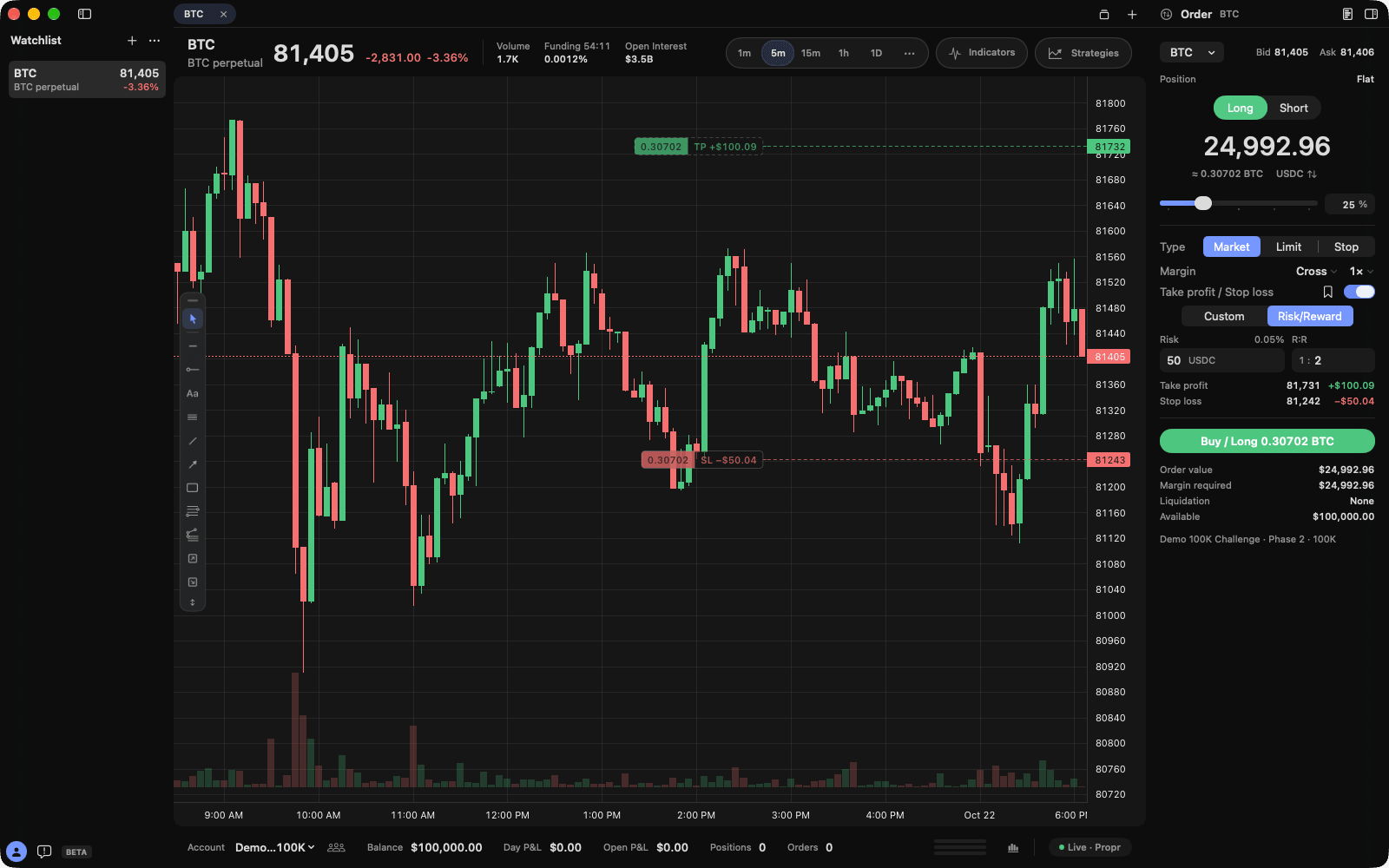
Risk/Reward orders for Propr
Set a Propr order's stop loss and take profit from the dollars you're willing to lose and a risk-to-reward like 1:2. Slide the size and both prices move to keep that risk, and the chart shows each line before you send. Holding a position? Turn on Reduce Only to close part of it.
New
- The Propr order sidebar has a new layout: one big size over a slider, with a box beside it to type the percentage, the order’s settings in simple rows, each stop and target listed with its price and dollars, and Cancel Orders and Exit Position only when there is something to cancel or close. It replaces the earlier card layout.
- The Propr order sidebar can set your stop loss and take profit by Risk/Reward: type the dollars you're willing to lose and a risk-to-reward (R:R) like 1:2, and both prices move closer or further as you slide the size, so the risk stays the same. Dragging either line on the chart updates the risk or the ratio.
- While you hold a Propr position, the order sidebar shows a Reduce Only switch: turn it on to close part or all of the position, with the size capped at what you hold and no stop or target attached.
- With Bracket on in the order ticket, the chart previews your order's stop loss and take profit lines (and its limit or stop price) before you send it, and you can drag any of them to set the price; hover Buy or Sell to see that side's bracket.
- The account bar under the chart now shows your open P&L across all positions and how many working orders you have, stops and targets included.
- With a Propr account, the bottom bar shows three tiny bars for your profit target, daily loss and drawdown. Once you've used half of a loss limit its bar turns amber, then red, and the closer limit says how much you have left. Click them for the challenge panel, which shows each limit as a bar with what's used, what's left and your drawdown floor, above leverage and margin.
Improved
- Entry boxes in the Propr order sidebar, like the limit price, Risk/Reward and size percentage fields, drop their outlines for a soft fill that lights up while you type.
- Chart windows and grids now use the same chart as the main window, and they use far less CPU, so the crosshair stays smooth with four charts open; grid panes use the compact chart header.
- Every popover, from the timeframe, indicator and strategy pickers to the ticket's leverage and the feedback form, now uses your workspace's tint instead of a plain gray, so they match the rest of the window.
Fixed
- XRP, DOGE and other perps that trade in whole coins now get the Propr perp ticket instead of the futures one.
- Clearing a perp stop or target's dollars, price or share now leaves the field empty for your new number, instead of putting back the first digit you deleted.
Lightwick 0.1.0 (202610190544)
New
- Connect Propr with your API key to trade your challenge and funded accounts on Hyperliquid perps (crypto, stocks, commodities and FX) with live Hyperliquid charts, DOM, footprint and prints, a perp ticket laid out in cards where you pick Buy or Sell first, sizes orders in dollars or coins with a slider up to what you can open and sets Cross or Isolated margin and leverage with the estimated liquidation price before you send, stops and targets you set by dollars or by price, each updating the other, with up to four each taking a share of the order, each position's liquidation, break-even, fees and funding, maker or taker and liquidation marks on fills, and a Challenge panel for your targets, drawdown and leverage.
- Watch Hyperliquid's live crypto, stock, commodity and FX perps without any account or key: choose Propr, then Market Data Only, for charts, the DOM, footprint and prints, with funding and its countdown and open interest in the chart header.
- Lines, rays, arrows, channels, rectangles and the pen now come with presets in your theme's rising and falling candle colors, plus black or white to match a light or dark chart.
Improved
- Lightwick now requires macOS 27, so every control is the system's newest version.
- The app is now called Lightwick (Beta) in the menu bar, Dock and Finder.
- The order sidebar shows your position and its P&L just under the ticker, even when you're flat, and ends with your working orders; Flatten All and Cancel All moved off it, and Flatten All stays on its hotkey (Control-Shift-F by default).
Fixed
- The chart workspace is smooth again: it no longer redraws itself nonstop, which made the crosshair and the rest of the window stutter and kept a CPU core busy even while idle, and each price tick now does less work.
Lightwick 0.1.0 (202610162037)
New
- An Update button appears beside the feedback button when a new build is ready. Hover it to see what changed, or click it to restart into the update now.
Improved
- On Rithmic and TopstepX you can now move a resting entry order that has a stop and target until any of it fills, and the stop and target keep their distance from your fill.
- One-click orders on Rithmic now go out sooner.
- The copy trader now matches each follower's position to the leader's at market once the leader's order fills, instead of copying every order, so a follower is never left out of a trade whose entry filled only for the leader.
- Each copy trader follower now carries one stop at the leader's stop price, which moves with it, and follows the leader's exits, including targets, at market. A stop you place on a follower yourself stays while the leader has none, and the Missed Fills setting is gone.
- Setup is more compact, and choosing Rithmic, TopstepX or simulated data now looks like the rest of setup, with your login fields in one column.
- The Strategy Tester is now marked Experimental next to its title.
- As you narrow the watchlist, it keeps names, daily changes, prices and its controls longer before switching to a more compact layout, and only drops to tickers alone near its narrowest width.
- The feedback button at the bottom of the watchlist is larger and stays right beside your account until the watchlist is nearly at its narrowest, and your account stays tucked into the bottom-left corner.
- The menu bar is tidier: Help has Send Feedback, View can show or hide the watchlist, depth ladder and order panel, the Window menu lists Accounts, Copy Trader, Trade History and Price Alerts, and your Lightwick account moved to the Lightwick menu. The Simulator, Strategy, History and Account menus are gone; open the Strategy Tester with its button in the account bar.
- Lightwick checks for updates every hour instead of once a day, so new builds are ready by the time you quit.
- Charts with indicators or the order-flow heatmap redraw faster, so the crosshair and live ticks stay smooth on long histories.
- The Indicators popover no longer has an Add Zone Tracker Example button; Gap Zone Tracker is still under Templates in the Strategy Library.
- The built-in themes are now called Default Light and Default Dark, the Midnight theme is gone, and Default Light uses a softer, slightly warm white and gentler green and red candles that are easier on the eyes.
Fixed
- The order ticket's Estimated value now shows what the contracts are worth, such as $300,000 for one ES at 6000, instead of just quantity times price.
- The Activity window no longer labels every account Test; it shows Test, Paper or Sim only for those accounts.
- Choosing Limit or Stop in the order ticket now starts the price at the current market instead of where it was when the ticket opened, unless you set the price yourself.
- When the order ticket can send only Buy or only Sell, such as a buy stop below the market or a buy past your Max Position, it now says why instead of just greying out the button.
- The order ticket now warns before you click when your stop or target quantities don't add up to the order, or when a TopstepX order has more than one stop or target.
- On TopstepX, fill messages and the Activity window now name contracts like MESZ6 instead of CON.F.US.MES.Z26.
- On TopstepX, the stop and target of a resting entry no longer count toward your Max Position before the entry fills, so an opposite order isn't refused while you're flat.
- The Accounts panel's Risk tab now shows when your daily loss limit was reached earlier today, as the account bar does.
- The DOM's hover text now says Review instead of Place when a click opens a review, and an Exit or Cancel confirmation no longer stays up after you switch accounts.
- Clicking Buy or Sell right after typing a quantity or price in the order ticket now uses what you typed, even if you didn't press Return.
- On Rithmic, searching for a product such as MES no longer offers its untradeable root symbol first, so you pick a contract like MESZ6 that accepts orders.
- The order ticket now refuses a buy stop below the market or a sell stop above it, which the exchange would reject, and says why before you click.
- On TopstepX, a stop, target or limit order that fills after resting now shows as filled instead of staying in your working orders and on the chart.
- The order ticket's stop and target distances no longer reset when you click the DOM, review a chart order or reopen the order panel, and they now start at 20 ticks of your product, including when you first open Lightwick, add a stop or target, or switch products, so ES's 5 points don't become a $5,000 stop on crude oil.
- Closing a position that has a stop and target by selling or buying it yourself no longer trips your Max Position limit, and while your daily loss or position-increase limit is blocking new trades it tells you to use Exit instead.
- Clicking × on an order in the chart now cancels it while new orders are paused, as the DOM and hotkeys do, instead of doing nothing.
- Scrolling the DOM with a mouse wheel now moves a row per notch instead of barely moving.
- On Rithmic, an order or move sent just after another no longer fails saying trading synchronization is incomplete.
- A refused DOM order now says why in the DOM even with the order panel hidden, and a review or refusal from a split or grid pane now shows in the order ticket instead of disappearing.
- Changing the quantity with a hotkey or the chart's quantity box while the order panel is hidden now resizes a single stop and target to match, so the next order with a stop and target isn't refused.
- A fill that happens while Lightwick is resyncing your account now plays its fill sound.
- Exit and Flatten All now finish closing your position even if one of its orders can't be cancelled, then cancel anything still working so a leftover stop can't open a new position, and tell you if one couldn't be cancelled.
- Flatten All now closes every position even if one of them closes on its own or fails partway, and names any position it couldn't close.
- Exit and Cancel stay available while market data is slow or catching up after your Mac wakes, as long as the order connection is up.
- Confirming an exit from the DOM, a hotkey or the Activity window on Rithmic no longer fails when the position's open P&L changes before you confirm.
- You can now drag a bracket stop to breakeven or into profit on Rithmic and TopstepX.
- The copy trader now works with Rithmic accounts, and keeping followers in sync no longer switches your selected account or pauses your own orders and exits.
- A copy trader follower's exit keeps retrying until it's flat, a follower whose broker is slow to update its position is no longer bought extra contracts, and changing a follower's size mid-trade no longer makes it trade against the leader.
- One offline follower no longer stops a copy group from copying to the others.
- On Rithmic, a stop and target released while Lightwick was syncing your account can now be cancelled and exited, and a position closed while you were disconnected no longer reappears after reconnecting.
- On Rithmic, orders, cancels and exits no longer fail with a permission error after Lightwick refreshes your account list, and accounts without firm product limits can place orders.
- When Rithmic or TopstepX times out or drops the connection mid-order, Lightwick now treats the order as possibly sent and checks instead of saying it wasn't sent.
- A Rithmic stop or target can be moved again after a move whose confirmation was lost, and dragging one target onto another's price no longer loses track of the moved order.
- A stop moved from another platform no longer gets stuck as "modification pending" in Lightwick.
- An account over its position limit can now reduce its position a contract at a time.
- On Rithmic, fills from the evening session open are no longer missing from history after midnight UTC, and one unreadable fill no longer blocks trading for the day.
- On TopstepX, orders on 0.1- and 0.01-tick contracts such as gold and crude oil now send exact prices.
- On TopstepX, a market order or close near the request limit now goes out right away or tells you it wasn't sent, instead of waiting up to a minute.
- On TopstepX, you can still cancel, move and close what's open when new trading is turned off on the account, and closing a position TopstepX had already closed now finishes instead of failing.
- On TopstepX, a close that may still be working can no longer be sent twice after a reconnect, which could have reversed your position.
- TopstepX no longer shows Live while frozen after a reconnect, reconnects over one unreadable price update, or keeps retrying a rejected username, API key or API subscription.
- If the connection resets while an order is being sent, Lightwick now says it may have gone through instead of showing an error code.
- Quitting now warns about open positions on every broker account, and when a running copy group would stop copying exits.
- After a failed account switch, the status now says Choose an Account instead of Reconnecting.
- ⌘W now closes the current chart tab instead of the whole workspace window. Use ⇧⌘W to close the window.
- Moving a simulator entry order that has a stop and target now moves the stop and target with it, so the trade is no longer stopped out the moment it fills.
- Dragging an order again while the broker is still confirming the last move, in the same chart or another pane or window, now sends the new price once that move settles instead of ignoring it.
- A stop and target can no longer be attached to an order that closes or reverses your position, where they could open a new, unprotected position; the order ticket says so before you click and points you to Exit, which also cancels your working stop and target.
- When the order ticket is set to a different contract than the chart, chart, DOM and hotkey orders are refused instead of sending the ticket's quantity on the chart's contract.
- Right-click chart orders, DOM clicks in Immediate mode and hotkeys, including in Charts grid and split panes, now use the order ticket's quantity, stop and target instead of going out with no stop or target.
- Trading hotkeys that use ⌘, ⌃ or a function key now work while a ticket field has focus, such as right after clicking Buy.
- Double-clicking a DOM cell now sends one order instead of two.
- Chart and DOM right-click menus now offer only orders that rest at the clicked price, so a buy limit above the market or a stop on the wrong side can no longer fill or trigger at once.
- Dragging a working order, stop or target past the market is now refused instead of filling or triggering it at once.
- After a chart or DOM order review, the ticket shows only that order's Buy or Sell button, so it can't be sent as the opposite side.
- A market order's stop and target now keep their distance from your entry when the market moves while the confirmation is open.
- The Activity window's price fields now read a price like 4512.25 correctly in regions that write decimals with a comma.
- Exit, Flatten All and Cancel stay available while an entry order is still being sent.
- Exit, Cancel and Flatten All now refuse instead of acting while your broker is still switching to a different account than the window shows.
- Confirming Flatten All or Exit from a hotkey on Rithmic no longer fails with "Account state changed" whenever open P&L ticks.
- Prices in the DOM, bracket points, the chart header, fill and move messages, the Activity window and the Accounts panel's Positions and quote columns now show every decimal of the contract's tick, so 6E prices no longer all read 1.08.
- Confirming Move Order on a chart drag now always moves the order.
Lightwick 0.1.0 (202610142010)
The first public beta
The first Lightwick build anyone can download. It installs itself from the disk image, and from here on updates download in the background and install the next time you quit. These notes sum up what it brought together.
New
- Copy trader: mirror a leader account's trades to follower accounts.
- Connect AI assistants to your strategies with the built-in MCP server (Settings → MCP Server).
- 24 code-editor themes, and separate themes for light and dark mode.
- Lightwick installs itself into Applications from the downloaded disk image.
Improved
- Trading hotkeys need a modifier key, and send the order ticket's bracket with the order.
- Position and working orders sit at the bottom of the order sidebar.
- Settings are reorganized around trading.
Fixed
- CME holiday closures and early halts count as closed, and the simulator no longer fills on a closed market's last quote.
- Hotkey orders are refused when the ticket's bracket is for another product.
Copy trader, code-editor themes, and MCP inside the app
- Copy Trader mirrors one leader account’s orders to any number of followers. Size each follower to match the leader, by a multiplier, or with a fixed number of contracts. Open it from the Accounts panel or the Window menu.
- 24 code-editor themes, including Dracula and Nord. Themes now apply to the workspace as you change them, and can set chart text, grid, crosshair, and order line colors.
- Light and dark appearances each keep their own theme.
- The MCP server now ships inside Lightwick. Settings → MCP Server shows the setup for your Mac, including Add to Claude Desktop.
- Settings are reorganized with trading first.
- Watchlist quotes stay readable as the sidebar narrows.
Fixed
- Trading hotkeys now need ⌘, ⌃, or ⌥, so typing can’t send an order.
- A hotkey order is refused when the ticket’s bracket belongs to another product.
- CME holiday closures and early halts count as closed, and the simulator no longer fills on a closed market’s last quote.
- Switching accounts waits for orders in flight, and a failed switch never sends orders to another account.
- Unreadable chart, drawing preset, and theme settings are set aside at launch, so Lightwick still opens.
- Unsaved strategy edits are kept when you visit the strategy library.
Safer order handling
- Lightwick asks before quitting with open positions or working orders.
- Exit and Flatten All work while another order action is pending.
- When orders are set to review first, dragging a chart order or cancelling it with × asks before it’s sent.
Fixed
- Open simulator shorts count against buying power.
- The order-flow heatmap keeps drawing through busy sessions, and its price axis shows every tick.
Chart order entry and tab positions
- Pick order ticket prices from the chart, and step prices and brackets by ticks.
- Each chart tab keeps its scroll and zoom when you switch tabs.
- The startup screens follow your Mac’s appearance.
- Create with AI now uses the chart you’re looking at as context.
Fixed
- The TopstepX depth ladder no longer fills up with stale price levels.
Extended hours and grouped brackets
- Charts shade extended hours and mark the market open.
- Bracket legs are grouped in Active Orders, with one button to cancel them together.
- Chart orders and trading hotkeys send with one click by default, and the depth ladder still confirms. To confirm every live-account order, turn off one-click trading in Settings → Trading.
- Open Chart Settings from the chart’s right-click menu.
Fixed
- Clicking × on a chart order cancels it instead of picking it up to move.
- On TopstepX, the balance shows net liquidation while you’re in a position, and order messages name the ticker instead of the contract ID.
Bug reports with logs and screenshots
- Bug reports can include the connection log, screenshots, and recent crash reports. You see every attachment and can untick any of them, and your draft is kept if you close the form.
- Lightwick asks you to accept the terms once, before you sign in.
Automatic updates
- Lightwick updates itself. It checks once a day, downloads in the background, and installs the next time you quit, so a session is never restarted. Choose Lightwick → Check for Updates… to check now.
- Sidebars open and close more smoothly.
- Charts show a simple loading status while history arrives.
Fixed
- Switching timeframes with the crosshair over the chart no longer breaks the chart.
A new first launch and Heikin Ashi
- First launch is one flow: a welcome, your Lightwick account, then your market data connection.
- Sign in with native Mac controls.
- Heikin Ashi candles.
- A feedback button in the workspace sends bug reports and ideas straight to us.
TopstepX and every Rithmic system
- Connect a Topstep account through TopstepX API access, alongside Rithmic.
- Rithmic connections cover 26 systems from Rithmic’s connection catalog. Choose your system and gateway when you sign in.
- Sign in to the app with your Lightwick account.
Footprint charts, drawings, and price alerts
- Footprint charts were rebuilt, with their own settings.
- Price alerts. Right-click the chart and choose Create Price Alert…, or manage every alert from Chart → Price Alerts… (⇧⌘A).
- New drawing tools, drawing presets and defaults, and drawings that stay put when you change timeframe.
- An Accounts window with tabs, stats, and positions.