The short answer
- Native Mac options
- Lightwick, MotiveWave, Bookmap with its footprint add-on, and the ATAS X beta. TradingView offers a volume footprint on Premium plans and above, and Tradovate includes footprints for Tradovate accounts, both in a Mac app or browser.
- Windows only
- NinjaTrader Desktop, Sierra Chart, Quantower, and classic ATAS. On a Mac they need Parallels or another virtual machine.
- Data it needs
- Every trade, tagged with whether it hit the bid or lifted the ask. Market depth is not required. For past bars, the platform also needs that tick history.
Read a footprint
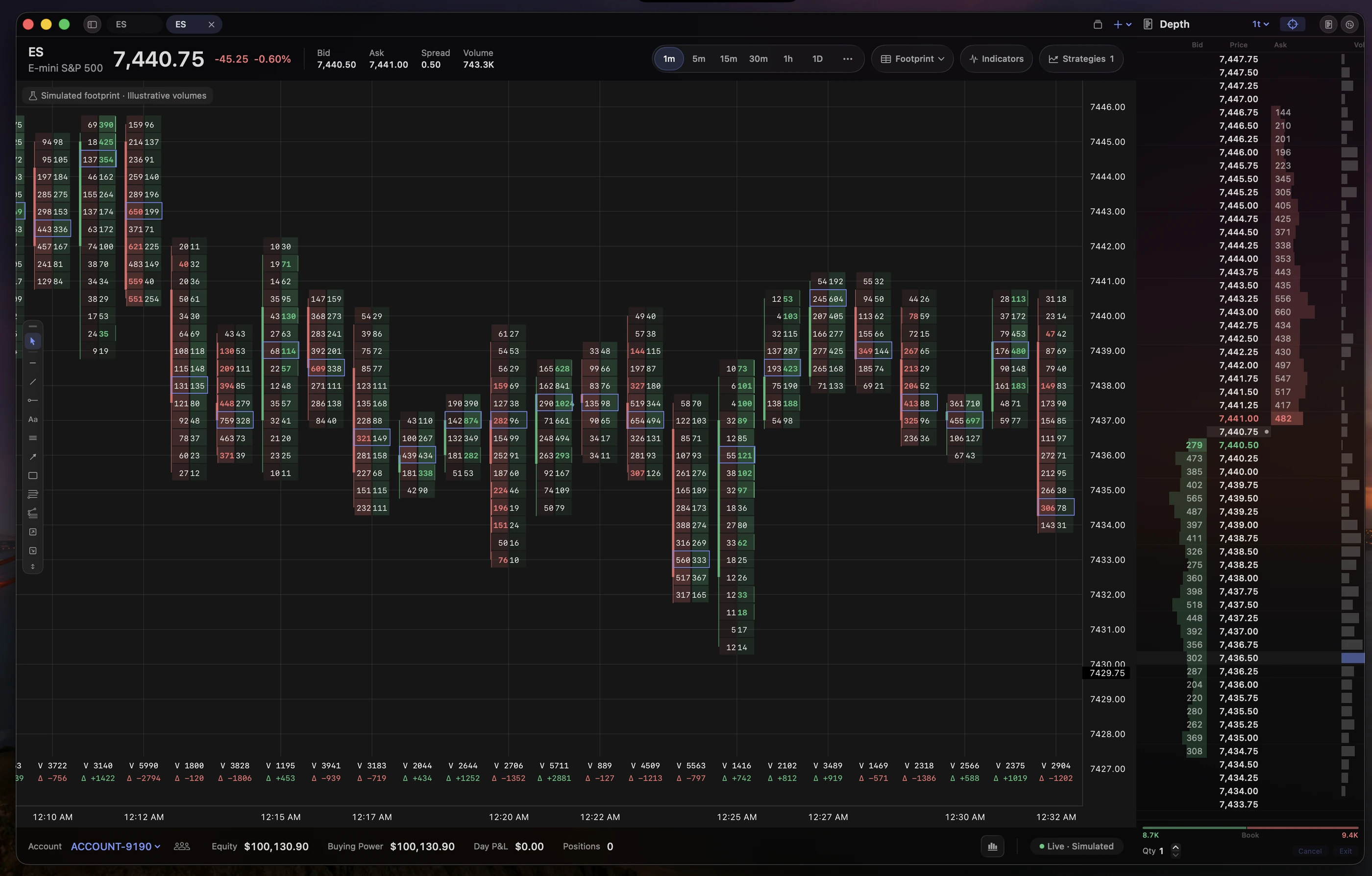
A candlestick tells you where a bar opened, closed, and traded. A footprint keeps that outline but fills it with numbers: at each price, the volume of market sell orders that hit the bid on the left, and market buy orders that lifted the ask on the right.
- Bid × ask
- Volume that traded at the bid, then volume that traded at the ask, for one price inside one bar. Shading makes the larger levels stand out.
- Delta
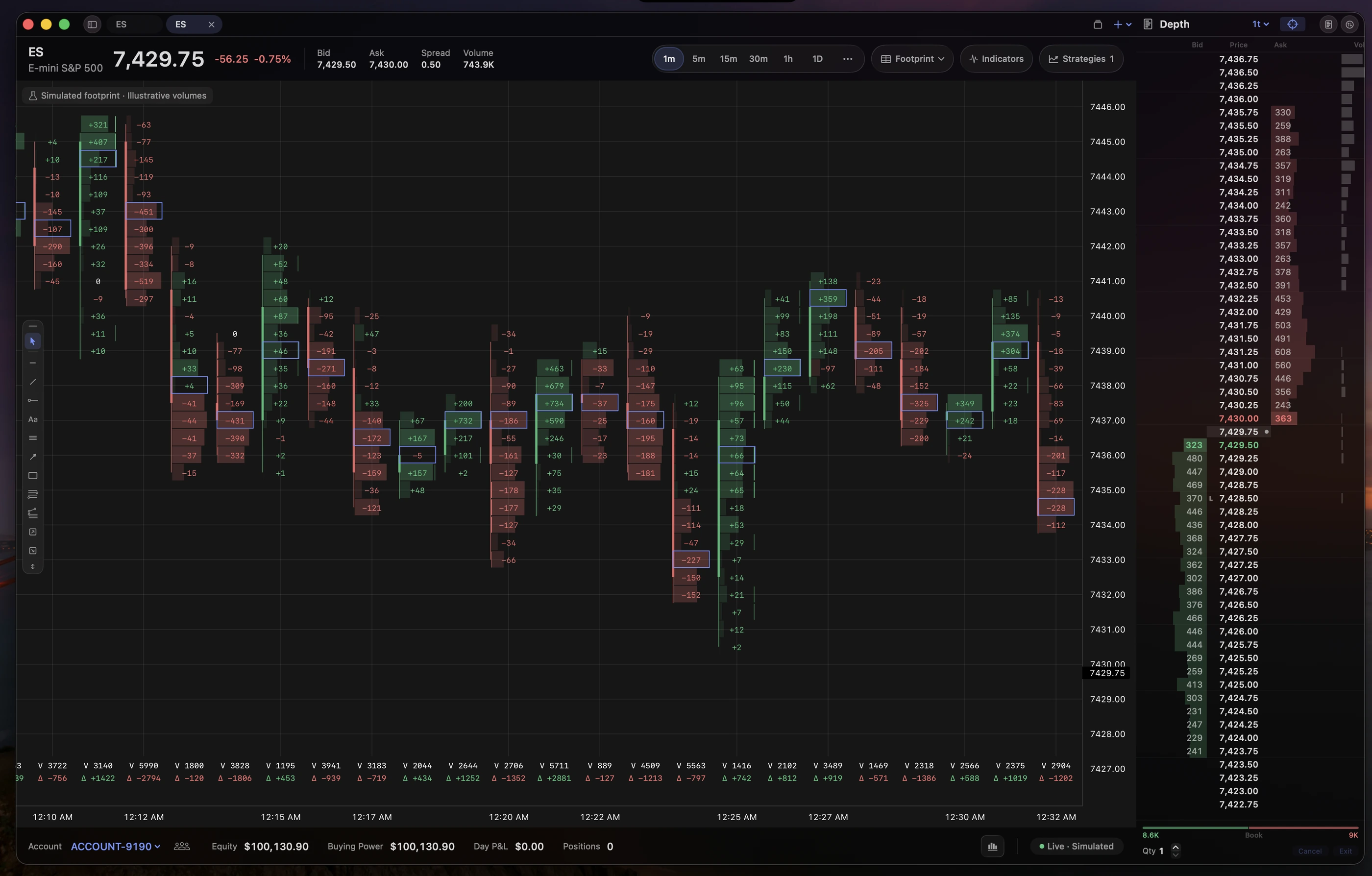
- Ask volume minus bid volume. Positive delta means more aggressive buying at that level or in that bar. The total under each bar sums it across the bar.
- Imbalance
- A level where one side greatly outweighs the other. Most platforms compare diagonally, the bid at one price with the ask one tick above, because a buyer lifting the offer meets the next price up. Several in a row are called stacked imbalances.
- Point of control
- The price with the most volume in the bar. The value area is the range around it holding a set share of the bar’s volume, typically 70%.
Read cells in context. Heavy selling at the bottom of a bar that closes near its high can mean sellers were absorbed. The same selling in a bar that closes on its low is just selling. A footprint shows what traded, not what traders intended.
The data behind it
A footprint is built from the trade feed, not the order book. Each trade needs a side: did it execute at the bid or at the ask? Some feeds tag it. Otherwise the platform compares the trade price with the bid and ask at that moment and picks the nearer side. Sierra Chart documents exactly this rule.
Live bars
Any platform receiving tick-by-tick trades with the current bid and ask can build footprints as the market moves. Your Rithmic account’s market data is enough for this.
Past bars
Earlier bars need stored tick history with bid and ask volume, which is where platforms differ most. Some download days or years of history from their own servers. Others only fill in what they recorded while running. TradingView works from intrabar data that becomes coarser the further back you scroll.
Exchange fees
CME real-time data is billed per exchange (CME, CBOT, NYMEX, and COMEX) by your data provider. Top-of-book data is cheaper than depth, and a footprint needs trades, not depth. Your firm or broker sets the final price.
Mac platforms compared
Details below come from each vendor’s own pages, checked on October 9, 2026. We haven’t benchmarked these apps against one another.
| Platform | On a Mac | Footprint access |
|---|---|---|
| Lightwick | Native app for Apple silicon, macOS 15 or later. Rithmic and TopstepX. | Pro plan, $39 a month after beta; free during beta. Current-session history on Rithmic; live only on TopstepX. |
| MotiveWave | Native app, with Apple silicon and Intel downloads. | Order Flow edition and above. MotiveWave on Mac. |
| Bookmap | Separate Intel and Apple silicon versions. Rithmic, CQG, and dxFeed adapters on macOS. | Footprint add-on on the Global+ plan. Bookmap is built around its liquidity heatmap. |
| ATAS X | Beta for macOS Tahoe and Apple silicon. | ATAS says the beta does not yet match classic ATAS. ATAS on Mac. |
| TradingView | Mac desktop app or browser. | Volume footprint on Premium and higher plans, plus CME real-time data. |
| Tradovate | Mac desktop app or browser. Tradovate accounts only, not Rithmic. | Order Flow+ is listed in every Tradovate plan; prop firms decide what their accounts include. Tradovate on Mac. |
| NinjaTrader, Sierra Chart, Quantower | Windows only. A virtual machine on Apple silicon. | Mature footprint tools with long tick history. See NinjaTrader and Sierra Chart on Mac. |
Footprint charts in Lightwick
Choose Footprint from the chart-type menu on any intraday chart. On a Rithmic account, Lightwick builds cells from your trades and loads completed bars for the current session from Rithmic, so a chart opened mid-morning starts at the session open: 5 p.m. Chicago time for CME, CBOT, NYMEX, and COMEX. On a TopstepX account, footprints build live from the moment you connect.
- Pick a cell view. Bid × ask, delta, or total volume, with bid and ask side by side or stacked.
- Set the row size. Group several ticks into one row when bars span a wide range, so the numbers stay readable.
- Tune imbalances. Compare diagonally or at the same price, set the minimum volume and ratio, and choose how many consecutive rows count as stacked.
- Add context. Heatmap shading, point of control, value area, and per-bar totals for volume, delta, and delta percentage.
- Save it. Apply settings to every chart, one instrument, one timeframe, or one tab, and save presets you can export as JSON.
Know the limits before relying on it. Bars from earlier sessions show as plain candles, and daily and weekly footprints only build from live data. Volume the feed couldn’t assign to a side is shown separately, marked with a question mark, rather than guessed. A bar marked with an asterisk was only partly captured, for example after a reconnect. The strategy tester runs on standard bars, so footprint signals can’t be backtested yet.
Footprint charts are part of Lightwick Pro, $39 a month after beta and free while the beta runs. For the ladder side of order flow, see the DOM guide and order flow on Mac.
Common questions
Can I get footprint charts on a Mac without Parallels?
Yes. Lightwick, MotiveWave, and Bookmap run natively on macOS and offer footprints, ATAS X is in beta for macOS Tahoe, TradingView offers a volume footprint on Premium and higher plans, and Tradovate’s Mac app includes footprints for Tradovate accounts. NinjaTrader Desktop, Sierra Chart, Quantower, and classic ATAS are Windows programs.
Why does my footprint look different from someone else’s?
Platforms classify trades differently and aggregate price rows differently. A feed may tag each trade with its aggressor side, or the platform may infer the side from the nearest bid or ask. TradingView builds footprints from intrabar data that gets coarser further back, and says its study repaints by design. Compare the same contract, row size, and session.
Do I need a Level 2 data subscription for footprint charts?
Not for the footprint itself. Sierra Chart notes that footprint bars do not require market depth data: they are built from trades. You need depth for a DOM or a liquidity heatmap.
Is a footprint useful on a daily chart?
It can show where volume concentrated within the day, but cells become dense. Most traders use footprints on intraday timeframes and widen the price-row size when bars cover a large range.
Further reading
- Sierra Chart: Numbers Bars (footprint) data requirements
- ATAS: finding and trading imbalances
- TradingView: volume footprint charts
- TradingView: plans and features
- Bookmap: system requirements and macOS adapters
- Bookmap: pricing and add-ons
- MotiveWave: macOS support
- ATAS: ATAS X (Beta) for Windows and macOS
- Tradovate: plans and included tools
Try Lightwick on your Mac.
Try Lightwick free during beta. No credit card required.
Join the free beta