The short answer
- Native Mac app
- Yes, in beta. ATAS X requires macOS Tahoe or later. ATAS says it “is not a full replica of the classic version.”
- Classic ATAS
- Windows only. ATAS’s own Mac article recommends Parallels Desktop or another virtualization tool.
- Rithmic accounts
- Supported, either directly or through R | Trader Pro’s plug-in mode.
- Real-time futures
- The PRO plan (€69.95 a month, or €39.95 a month billed yearly) or higher. START and PLUS are delayed 15 minutes.
ATAS X or classic ATAS
ATAS describes ATAS X as “an early version of the analytics platform for Windows and macOS, rebuilt from the ground up.” It is moving modules across in order of demand, so a tool you use every day in classic ATAS may not be in the beta yet.
| Option | On your Mac | Trade-offs |
|---|---|---|
| ATAS X (Beta) | Native app. ATAS lists macOS Tahoe or later and Apple silicon M1 or newer. | Still in development. Some features differ or are not available yet. ATAS’s developer notes say custom settings editors built for classic ATAS’s Windows interface won’t carry over. |
| Classic ATAS | Runs inside a Windows virtual machine, such as Parallels Desktop. | The complete feature set, including Smart Tape and replay. You pay for and maintain Windows and the virtual machine as well. |
ATAS X needs macOS Tahoe, so a Mac on Sequoia or earlier has to update first. Lightwick, for comparison, requires macOS 15 Sequoia or later on Apple silicon.
Run classic ATAS in Parallels
On an Apple silicon Mac, Parallels runs the Arm version of Windows 11. Microsoft names Parallels Desktop 18, 19, and 20 as authorized for M1, M2, and M3 Macs, and says x64 apps run there in emulation. ATAS is a Windows x64 app, so it runs through that layer.
- Check your Mac first. Boot Camp is only available on Intel Macs. On Apple silicon, a virtual machine is the Windows route.
- Install Windows 11 in Parallels, then download classic ATAS inside Windows. ATAS’s Mac article notes that Windows 11 in Parallels may need to be isolated from macOS.
- Give the virtual machine enough memory. Windows, ATAS, and your charts share the memory you assign. Leave enough for the Mac apps you keep open alongside it.
- Test a full session before you pay. ATAS paid plans have a 14-day trial. Watch for chart and DOM latency during a fast open, not only on a quiet afternoon.
ATAS’s Mac article doesn’t say whether ATAS supports Windows on Arm. If a problem only happens inside the virtual machine, ATAS support may ask you to reproduce it on a Windows PC.
Connect ATAS to Rithmic
Direct connection
Enter your Rithmic login and the server your firm provides, and leave “Connect via RTrader Pro” switched off. ATAS says the account must not be connected to R | Trader Pro or any other trading platform at the same time.
Through R | Trader Pro
Turn on “Allow Plugins” in R | Trader Pro and “Connect via RTrader Pro” in ATAS, with the same server selected in both, and keep both apps running. Only one Rithmic account can connect this way. Because R | Trader Pro is a Windows app, this mode only works inside Windows.
Either way, sign your Rithmic market-data agreements first. Our R | Trader Pro on Mac guide covers the browser-based routes some firms offer, and the Rithmic on Mac guide covers systems, gateways, and login problems.
Where Lightwick fits
Lightwick is a native Mac app for Rithmic and TopstepX accounts. Its footprint chart shows bid × ask, delta, or total volume in each cell, with imbalances, point of control, and value area. Volume Profile and TPO studies show where each session traded, and the DOM shows volume sold at the bid and bought at the ask beside the book.
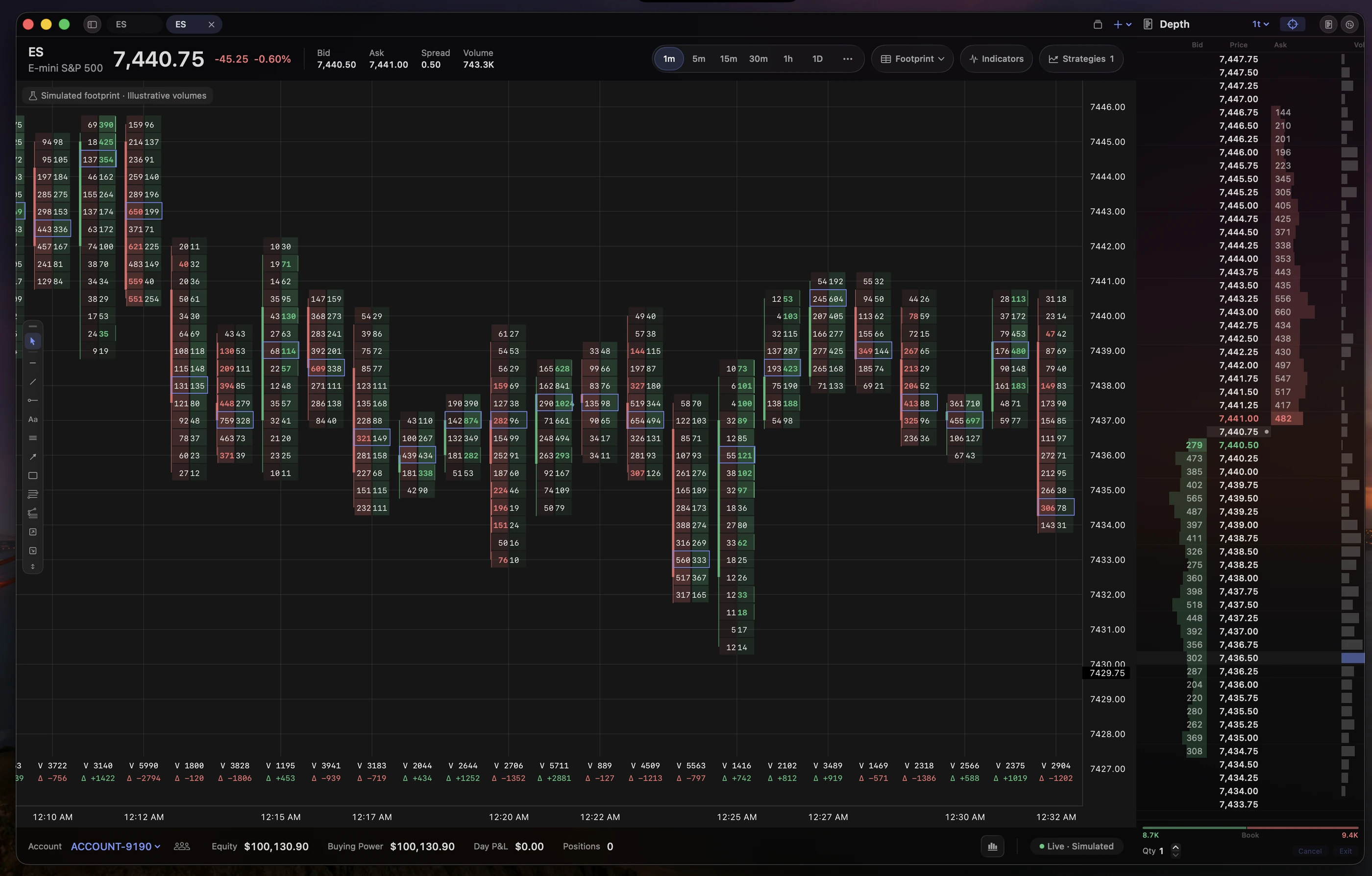
One difference matters if your connection is unreliable: Lightwick places stops and targets as Rithmic’s native server-side brackets, or TopstepX’s own brackets, rather than simulating OCO orders on your Mac.
ATAS goes further in other areas. Lightwick has no Smart Tape or Time & Sales window and no market replay. Its footprint history covers the current session only; bars from earlier sessions show as plain candles. If you depend on ATAS’s tape tools or multi-day footprint history, keep ATAS. If you want footprint and DOM trading for your Rithmic account without Windows, try Lightwick next to it.
Common questions
Is ATAS X free?
ATAS says ATAS X (Beta) is available to all ATAS users, regardless of subscription plan. Your plan still decides what data you can connect: ATAS lists real-time futures data from the PRO plan upward, with a 15-minute delay on START and PLUS.
Can I run ATAS and another platform on the same Rithmic login?
Not with ATAS’s direct connection. ATAS’s Rithmic article says the account must not be connected to R | Trader Pro or any other trading platform. Plug-in mode shares one R | Trader Pro session instead, which needs Windows. Your firm may also limit concurrent sessions.
Does ATAS connect to Tradovate?
Tradovate is not among the futures connections ATAS lists for ATAS X, and a Tradovate connection appears on ATAS’s public feedback board as a planned request. Prop firm Tradovate accounts and Rithmic accounts are separate, so check which one your firm issued.
Are ATAS’s OCO brackets held at the broker?
ATAS’s Rithmic article says OCO orders are simulated on your computer, and the platform must stay connected for them to work. If the connection drops and one order fills, the others are not cancelled automatically.
Further reading
Try Lightwick on your Mac.
Try Lightwick free during beta. No credit card required.
Join the free beta